
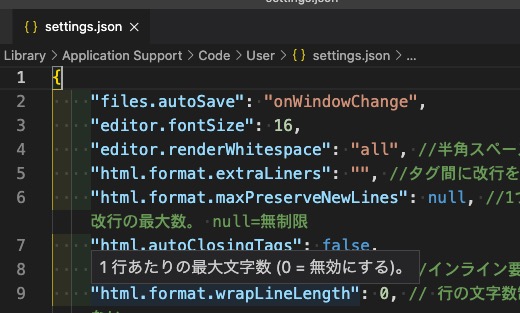
私のvscodeの基本設定について
こんにちは。
今日は私が職場で使っているエディター、Visual Studio Codeの基本設定についてメモがてら書こうと思います。
初めの頃はどんな設定をすればいいかわからなかったのですが色々調べていまに至ります!
誰かの参考になれば嬉しいです。
以前、拡張機能(プラグイン)についても書いたのでもし興味がある方はそちらもみてみてください( ´ ▽ ` )
では、基本設定について書いていきますね〜!
手順
基本設定の場所について
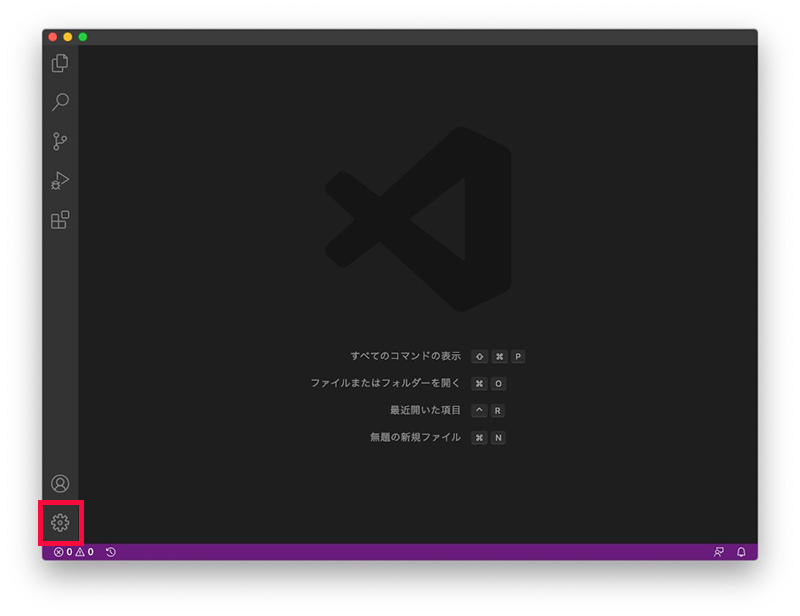
まず、基本設定の場所ですが、左下にある歯車マークです。
これをクリックするとこのようにズラーっと項目が出てくるのでこの中の「設定」をクリックします。
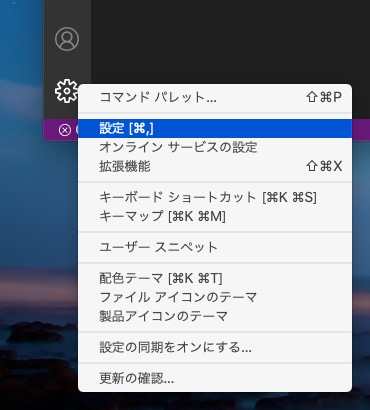
ちなみにショートカットは「command + ,(カンマ)」です。覚えるとラク!
すると、このような設定画面が出てきます。
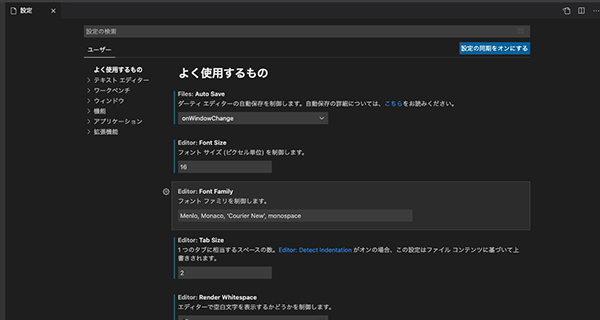
文字サイズなど簡単なものならここで設定できます。
しかし今回は「settings.json」という設定ファイル?(私もよくわかっていない・・・)に直接コードを記入していきます。
場所は右上のこのアイコンです。
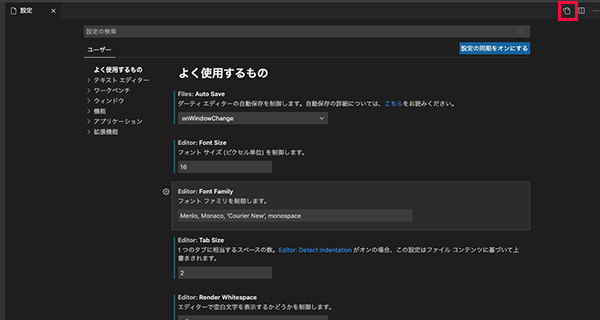
設定を記述する
すると、私の場合このようにズラーっとコードを記述しています。
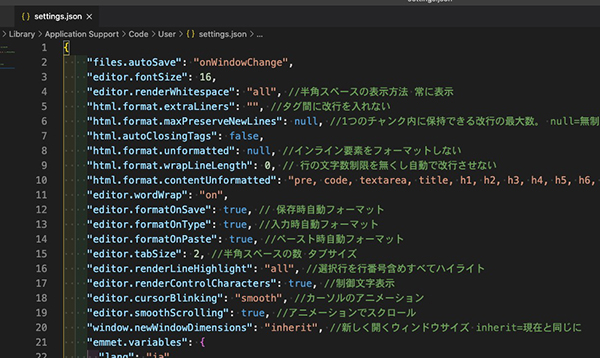
ここには、文字サイズや文字の折り返しなどの設定も含まれています。(上から2番目がfontsizeで文字サイズ)
この画面をみるとギョっとなるかもしれませんが1つ1つみてみるとなんとなく内容がわかるものもあります^^
私はとりあえず良さそうと思ったものを徐々にコピーしていきました笑
では長いですがコードを貼ります!
追記:2022年5月更新しました
{
"files.autoSave": "onWindowChange",
"editor.fontSize": 16,
"editor.renderWhitespace": "all", //半角スペースの表示方法 常に表示
"html.format.extraLiners": "", //タグ間に改行を入れない
"html.format.maxPreserveNewLines": null, //1つのチャンク内に保持できる改行の最大数。 null=無制限
"html.autoClosingTags": false,
"html.format.unformatted": null, //インライン要素をフォーマットしない
"html.format.wrapLineLength": 0, // 行の文字数制限を無くし自動で改行させない
"html.format.contentUnformatted": "pre, code, textarea, title, h1, h2, h3, h4, h5, h6, p", //タグ内の記述はフォーマットしない
"editor.wordWrap": "on",
"editor.formatOnSave": true, // 保存時自動フォーマット
"editor.formatOnType": true, //入力時自動フォーマット
"editor.formatOnPaste": true, //ペースト時自動フォーマット
"editor.tabSize": 2, //半角スペースの数 タブサイズ
"editor.renderLineHighlight": "all", //選択行を行番号含めすべてハイライト
"editor.renderControlCharacters": true, //制御文字表示
"editor.cursorBlinking": "smooth", //カーソルのアニメーション
"editor.smoothScrolling": true, //アニメーションでスクロール
"window.newWindowDimensions": "inherit", //新しく開くウィンドウサイズ inherit=現在と同じに
"emmet.variables": {
"lang": "ja"
},
// Live Sass Compile
"liveSassCompile.settings.autoprefix": [
"> 1%",
"last 2 versions"
],
"liveSassCompile.settings.formats": [
{
"format": "expanded",
"extensionName": ".css",
"savePath": "~/../css/"
}
],
// live sass compile
"liveSassCompile.settings.generateMap": false,
// CSS Comb
"csscomb.preset": {
"remove-empty-rulesets": true,
"always-semicolon": true, //セミコロン設定
"color-case": "lower",
"block-indent": " ",
"color-shorthand": true,
"element-case": "lower",
"eof-newline": true,
"leading-zero": true, //小数点0省略
"quotes": "double", //ダブルクォーテーション
"space-before-colon": "",
"space-after-colon": " ",
"space-before-combinator": " ",
"space-after-combinator": " ",
"space-between-declarations": "\n",
"space-before-opening-brace": "\n",
"space-after-opening-brace": "\n",
"space-after-selector-delimiter": "\n",
"space-before-selector-delimiter": "",
"space-before-closing-brace": "\n",
"tab-size": true,
"unitless-zero": true, //値が0のとき単位省略
"vendor-prefix-align": true,
"sort-order": [
[
"position",
"top",
"right",
"bottom",
"left",
"z-index",
],
[
"display",
"visibility",
"float",
"clear",
"overflow",
"overflow-x",
"overflow-y",
"-ms-overflow-x",
"-ms-overflow-y",
"-webkit-overflow-scrolling",
"clip",
"zoom",
"-webkit-align-content",
"-ms-flex-line-pack",
"align-content",
"-webkit-box-align",
"-moz-box-align",
"-webkit-align-items",
"align-items",
"-ms-flex-align",
"-webkit-align-self",
"-ms-flex-item-align",
"-ms-grid-row-align",
"align-self",
"-webkit-box-flex",
"-webkit-flex",
"-moz-box-flex",
"-ms-flex",
"flex",
"-webkit-flex-flow",
"-ms-flex-flow",
"flex-flow",
"-webkit-flex-basis",
"-ms-flex-preferred-size",
"flex-basis",
"-webkit-box-orient",
"-webkit-box-direction",
"-webkit-flex-direction",
"-moz-box-orient",
"-moz-box-direction",
"-ms-flex-direction",
"flex-direction",
"-webkit-flex-grow",
"-ms-flex-positive",
"flex-grow",
"-webkit-flex-shrink",
"-ms-flex-negative",
"flex-shrink",
"-webkit-flex-wrap",
"-ms-flex-wrap",
"flex-wrap",
"-webkit-box-pack",
"-moz-box-pack",
"-ms-flex-pack",
"-webkit-justify-content",
"justify-content",
"-webkit-box-ordinal-group",
"-webkit-order",
"-moz-box-ordinal-group",
"-ms-flex-order",
"order"
],
[
"-webkit-box-sizing",
"-moz-box-sizing",
"box-sizing",
"width",
"min-width",
"max-width",
"height",
"min-height",
"max-height",
"margin",
"margin-top",
"margin-right",
"margin-bottom",
"margin-left",
"padding",
"padding-top",
"padding-right",
"padding-bottom",
"padding-left",
"border",
"border-collapse",
"border-width",
"border-style",
"border-color",
"border-top",
"border-top-width",
"border-top-style",
"border-top-color",
"border-right",
"border-right-width",
"border-right-style",
"border-right-color",
"border-bottom",
"border-bottom-width",
"border-bottom-style",
"border-bottom-color",
"border-left",
"border-left-width",
"border-left-style",
"border-left-color",
"-webkit-border-radius",
"-moz-border-radius",
"border-radius",
"-webkit-border-top-left-radius",
"-moz-border-radius-topleft",
"border-top-left-radius",
"-webkit-border-top-right-radius",
"-moz-border-radius-topright",
"border-top-right-radius",
"-webkit-border-bottom-right-radius",
"-moz-border-radius-bottomright",
"border-bottom-right-radius",
"-webkit-border-bottom-left-radius",
"-moz-border-radius-bottomleft",
"border-bottom-left-radius",
"-webkit-border-image",
"-moz-border-image",
"-o-border-image",
"border-image",
"-webkit-border-image-source",
"-moz-border-image-source",
"-o-border-image-source",
"border-image-source",
"-webkit-border-image-slice",
"-moz-border-image-slice",
"-o-border-image-slice",
"border-image-slice",
"-webkit-border-image-width",
"-moz-border-image-width",
"-o-border-image-width",
"border-image-width",
"-webkit-border-image-outset",
"-moz-border-image-outset",
"-o-border-image-outset",
"border-image-outset",
"-webkit-border-image-repeat",
"-moz-border-image-repeat",
"-o-border-image-repeat",
"border-image-repeat",
"table-layout",
"empty-cells",
"caption-side",
"border-spacing",
"border-collapse",
"list-style",
"list-style-position",
"list-style-type",
"list-style-image",
"outline",
"outline-width",
"outline-style",
"outline-color",
"outline-offset",
"box-decoration-break",
"-webkit-box-shadow",
"-moz-box-shadow",
"box-shadow",
"filter:progid:DXImageTransform.Microsoft.gradient",
"-ms-filter:\\'progid:DXImageTransform.Microsoft.gradient"
],
[
"background",
"filter:progid:DXImageTransform.Microsoft.AlphaImageLoader",
"background-color",
"background-image",
"background-repeat",
"background-attachment",
"background-position",
"background-position-x",
"-ms-background-position-x",
"background-position-y",
"-ms-background-position-y",
"-webkit-background-clip",
"-moz-background-clip",
"background-clip",
"background-origin",
"-webkit-background-size",
"-moz-background-size",
"-o-background-size",
"background-size"
],
[
"font",
"font-family",
"font-size",
"font-weight",
"font-style",
"font-variant",
"font-size-adjust",
"font-stretch",
"font-effect",
"font-emphasize",
"font-emphasize-position",
"font-emphasize-style",
"font-smooth",
"line-height",
"text-align",
"-webkit-text-align-last",
"-moz-text-align-last",
"-ms-text-align-last",
"text-align-last",
"vertical-align",
"white-space",
"text-decoration",
"text-emphasis",
"text-emphasis-color",
"text-emphasis-style",
"text-emphasis-position",
"text-indent",
"-ms-text-justify",
"text-justify",
"text-transform",
"letter-spacing",
"word-spacing",
"-ms-writing-mode",
"text-outline",
"text-transform",
"text-wrap",
"text-overflow",
"-ms-text-overflow",
"text-overflow-ellipsis",
"text-overflow-mode",
"-ms-word-wrap",
"word-wrap",
"word-break",
"-ms-word-break",
"-moz-tab-size",
"-o-tab-size",
"tab-size",
"-webkit-hyphens",
"-moz-hyphens",
"hyphens",
"pointer-events",
"text-shadow",
"color",
],
[
"content",
"quotes",
"counter-reset",
"counter-increment",
"resize",
"cursor",
"-webkit-user-select",
"-moz-user-select",
"-ms-user-select",
"user-select",
"nav-index",
"nav-up",
"nav-right",
"nav-down",
"nav-left",
"-webkit-transition",
"-moz-transition",
"-ms-transition",
"-o-transition",
"transition",
"-webkit-transition-delay",
"-moz-transition-delay",
"-ms-transition-delay",
"-o-transition-delay",
"transition-delay",
"-webkit-transition-timing-function",
"-moz-transition-timing-function",
"-ms-transition-timing-function",
"-o-transition-timing-function",
"transition-timing-function",
"-webkit-transition-duration",
"-moz-transition-duration",
"-ms-transition-duration",
"-o-transition-duration",
"transition-duration",
"-webkit-transition-property",
"-moz-transition-property",
"-ms-transition-property",
"-o-transition-property",
"transition-property",
"-webkit-transform",
"-moz-transform",
"-ms-transform",
"-o-transform",
"transform",
"-webkit-transform-origin",
"-moz-transform-origin",
"-ms-transform-origin",
"-o-transform-origin",
"transform-origin",
"-webkit-animation",
"-moz-animation",
"-ms-animation",
"-o-animation",
"animation",
"-webkit-animation-name",
"-moz-animation-name",
"-ms-animation-name",
"-o-animation-name",
"animation-name",
"-webkit-animation-duration",
"-moz-animation-duration",
"-ms-animation-duration",
"-o-animation-duration",
"animation-duration",
"-webkit-animation-play-state",
"-moz-animation-play-state",
"-ms-animation-play-state",
"-o-animation-play-state",
"animation-play-state",
"-webkit-animation-timing-function",
"-moz-animation-timing-function",
"-ms-animation-timing-function",
"-o-animation-timing-function",
"animation-timing-function",
"-webkit-animation-delay",
"-moz-animation-delay",
"-ms-animation-delay",
"-o-animation-delay",
"animation-delay",
"-webkit-animation-iteration-count",
"-moz-animation-iteration-count",
"-ms-animation-iteration-count",
"-o-animation-iteration-count",
"animation-iteration-count",
"-webkit-animation-direction",
"-moz-animation-direction",
"-ms-animation-direction",
"-o-animation-direction",
"animation-direction",
"opacity",
"filter:progid:DXImageTransform.Microsoft.Alpha(Opacity",
"-ms-filter:\\'progid:DXImageTransform.Microsoft.Alpha",
"-ms-interpolation-mode",
]
]
},
"workbench.iconTheme": "vscode-icons", //フォルダアイコン
"breadcrumbs.enabled": true, //パンくずエリアにフォルダ階層を表示させる
"workbench.startupEditor": "none", // Welcome Page を表示しない
"editor.minimap.side": "left",
"workbench.tree.indent": 25,
"workbench.tree.renderIndentGuides": "always",
"workbench.editor.highlightModifiedTabs": true, //保存していないファイル名に下線がつく
"liveServer.settings.port": 0,
"editor.hover.enabled": false,
"liveSassCompile.settings.includeItems": [
"**/xxx.scss" //このファイルだけコンパイルしたい場合
],
"scss.format.enable": false //バージョンアップにより勝手に整形されるので阻止
}
ちなみに一番スペースを占めているのはCSSを自動で整形してくれる「CSSComb」についての設定です。
プロパティの順番を設定するのにめちゃめちゃ長くなっています(^^;
CSSCombを取り入れるとコードが整理されて見やすくなるのでおすすめです^^
検索すると色々記事が出てきます(^○^)
では時間がきたので今日はここまで〜〜

コメント